Fundraising is not a transaction. It is a calling.
Matreas is the fundraising system for Catholic and independent schools. It tracks the details and supports your relationships, so you can spend more time on the mission and with the people.
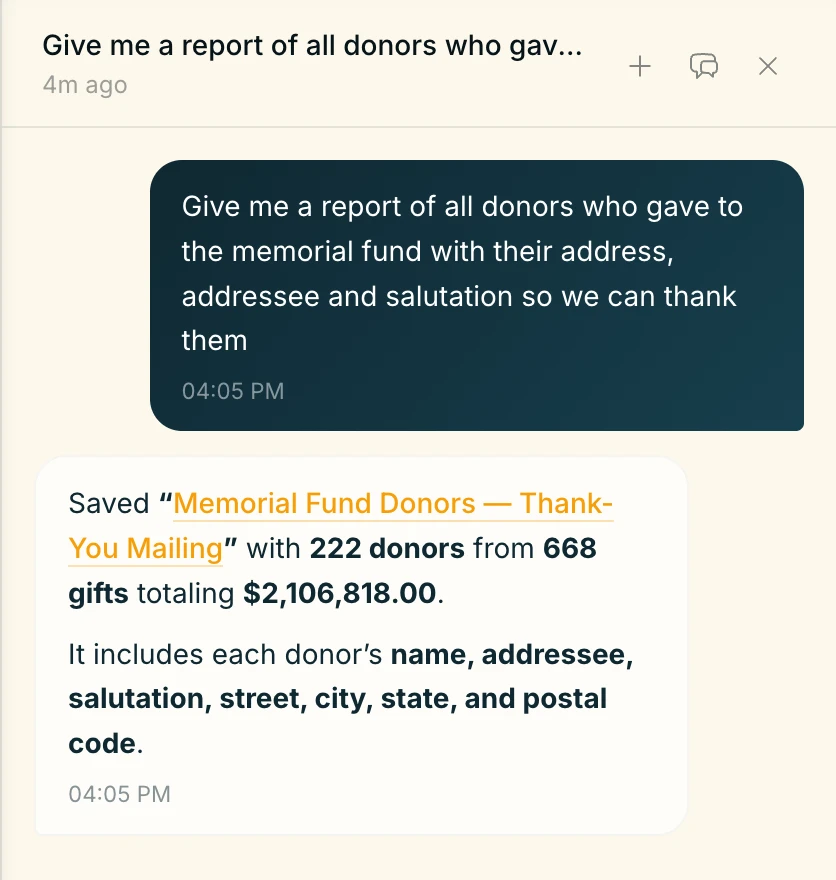
Built for schools with a story worth telling.
Most development offices run on a CRM built for data entry, not relationships: slow searches, rigid workflows, and your own data buried behind the vendor. Matreas is a system of record built around the people who give and the work a small office does every week. Less time keying, more time with families.
What you get:
- AI-powered workflows that handle the busywork while keeping humans in control.
- Seamless integrations with tools you already use.
- Fair, transparent pricing for teams that live by stewardship.
- Coming from Raiser’s Edge? We’ll give you a full dry run before you switch.
One person, the whole relationship.
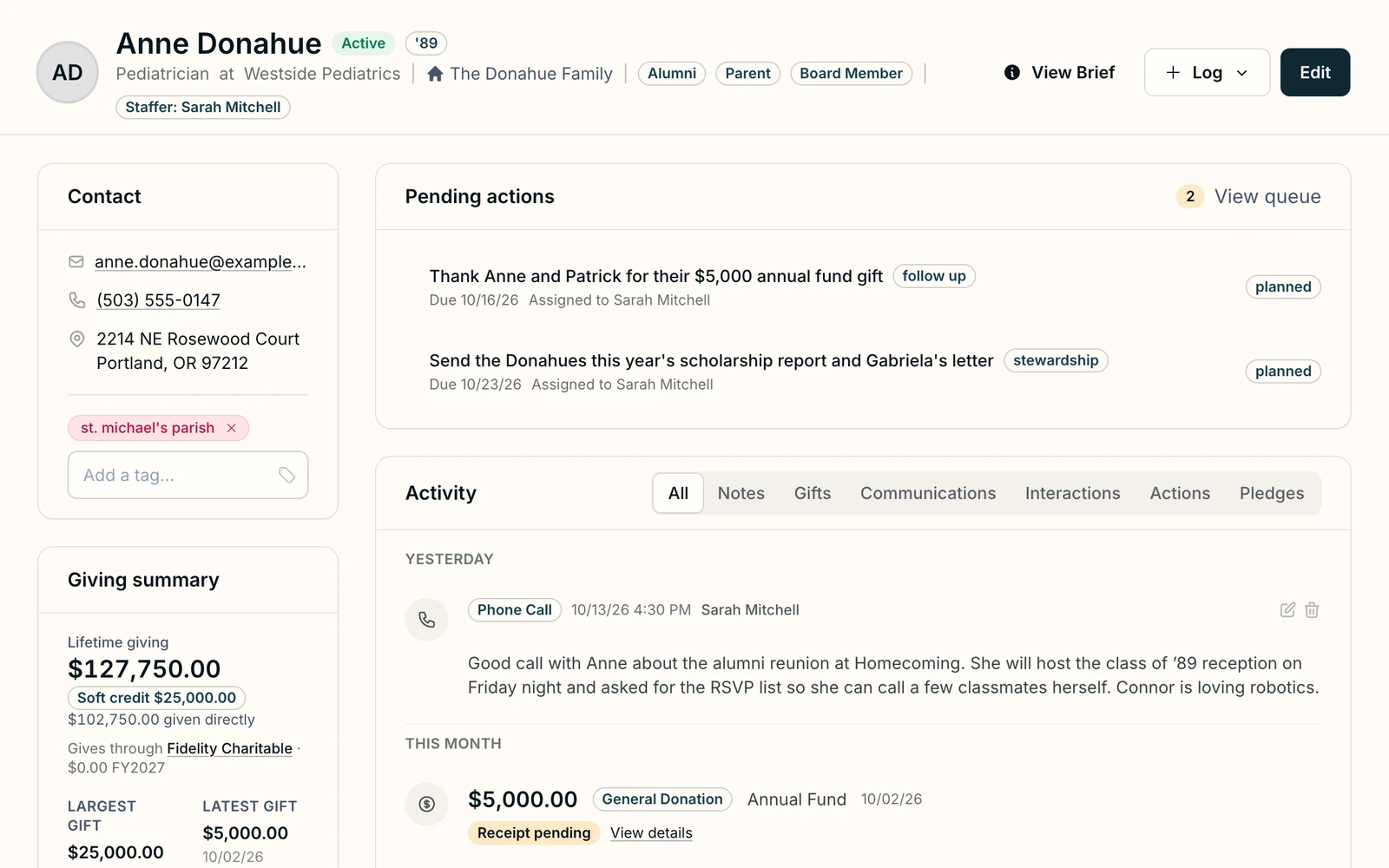
Anne Donahue ’89 is an alumna, a parent, and sits on the board. Her page holds what a development office knows about her: her household, her roles, who on staff looks after her, what is waiting to be done, and what has happened lately.
Every role, every gift and every conversation sits on one page, so nobody keeps a side spreadsheet and nobody has to ask who called her last.
- The Donahue Family. Her household is one click away.
- Alumni, Parent and Board Member. All three roles, on the same record.
- View Brief. Get a one-pager summary of what matters to Anne and the important details in your relationship.
- Pending actions. A thank-you and a scholarship report, both waiting on Sarah.
- A phone call, logged. Sarah’s notes from yesterday’s call about the reunion, at the top of Anne’s activity.
- Giving summary. What she gave directly, what was soft-credited to her, and the donor-advised fund she gives through.
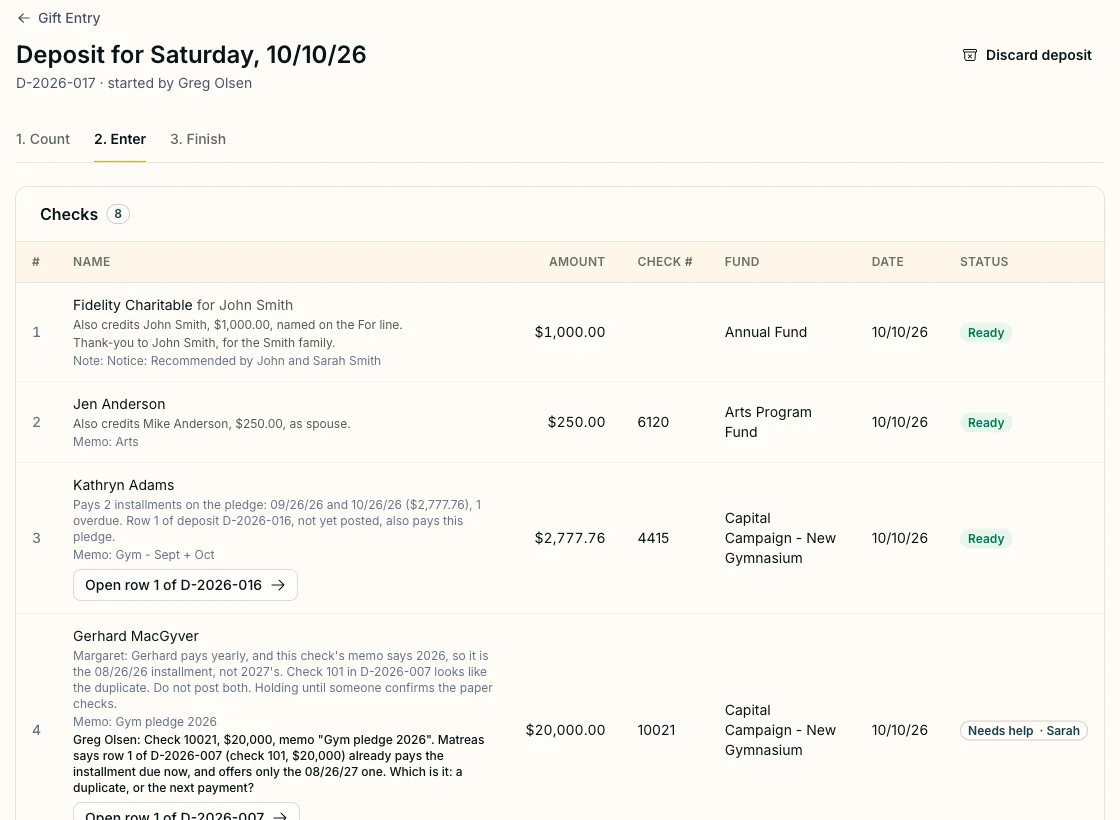
Monday’s stack of checks.
Eight checks, one deposit, a few minutes. Matreas checks the entries against the bank slip total, works out who gets credit, applies payments to the right pledges, and holds anything that looks wrong until a person confirms it.
- A Fidelity Charitable grant, credited to John Smith, who recommended it and is named on the check’s For line.
- One check from Kathryn Adams paying two pledge installments, one of them overdue.
- A $20,000 check that looks like a second copy of an earlier one, caught before it posts twice and held until someone confirms the paper checks.
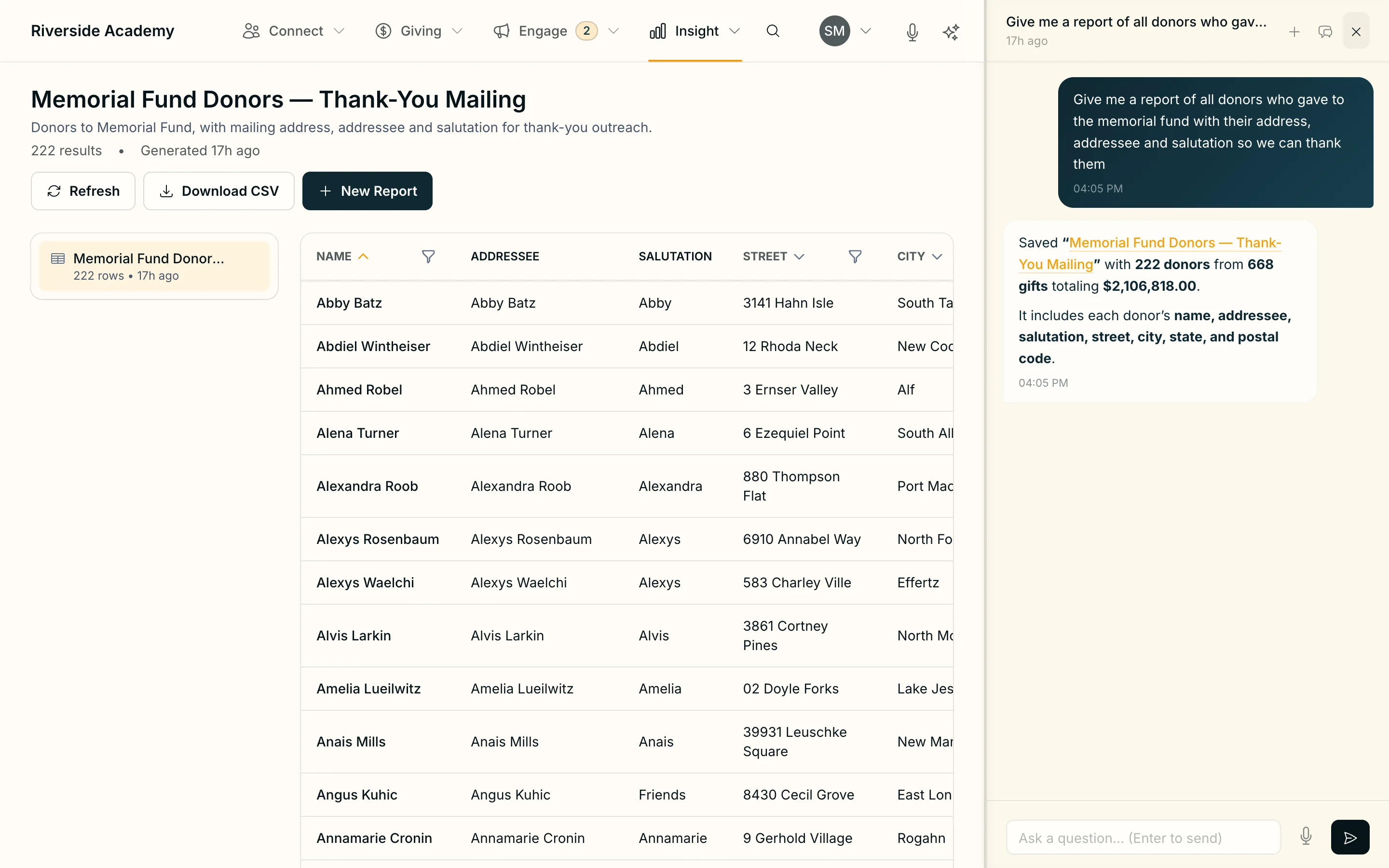
Ask in your own words.
Ask the way you would ask a colleague. Matreas answers, says what it counted, and saves a report with the addressee and salutation already filled in.
The AI reads and asks. Code counts the money. Nothing that handles money or reaches a donor happens until a person approves it.
- The question, in the words a development director would use.
- The answer says what it counted: how many donors, from how many gifts.
- Saved as a report, ready to run again or download as a CSV.
- Addressee and salutation come with each name, so the list is ready for the mailing.
What deserves attention this morning.
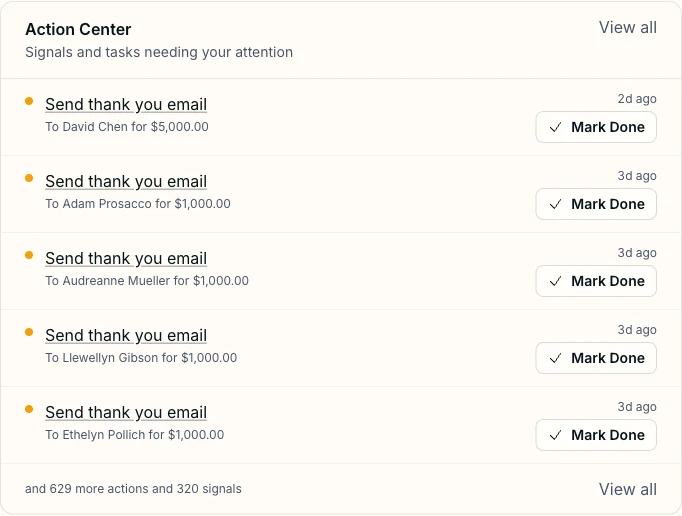
Open Matreas and the day’s work is waiting: the thank-yous still owed, with the gift and how long ago it came in, and the signals worth a call that nobody has spotted yet.
When it is done, mark it done.
Be one of the first schools on Matreas.
We’re in beta. Leave your email and we’ll set up a walkthrough with your office.
What moving from your old system takes
Your school has years of history in another database. Here is exactly what moving it involves. Nothing is written until you have seen every change.
What you send
Two exports from the system you use now, saved as CSV files: one of your people and one of your gifts. No passwords, no login, no access to your system.
What happens to them
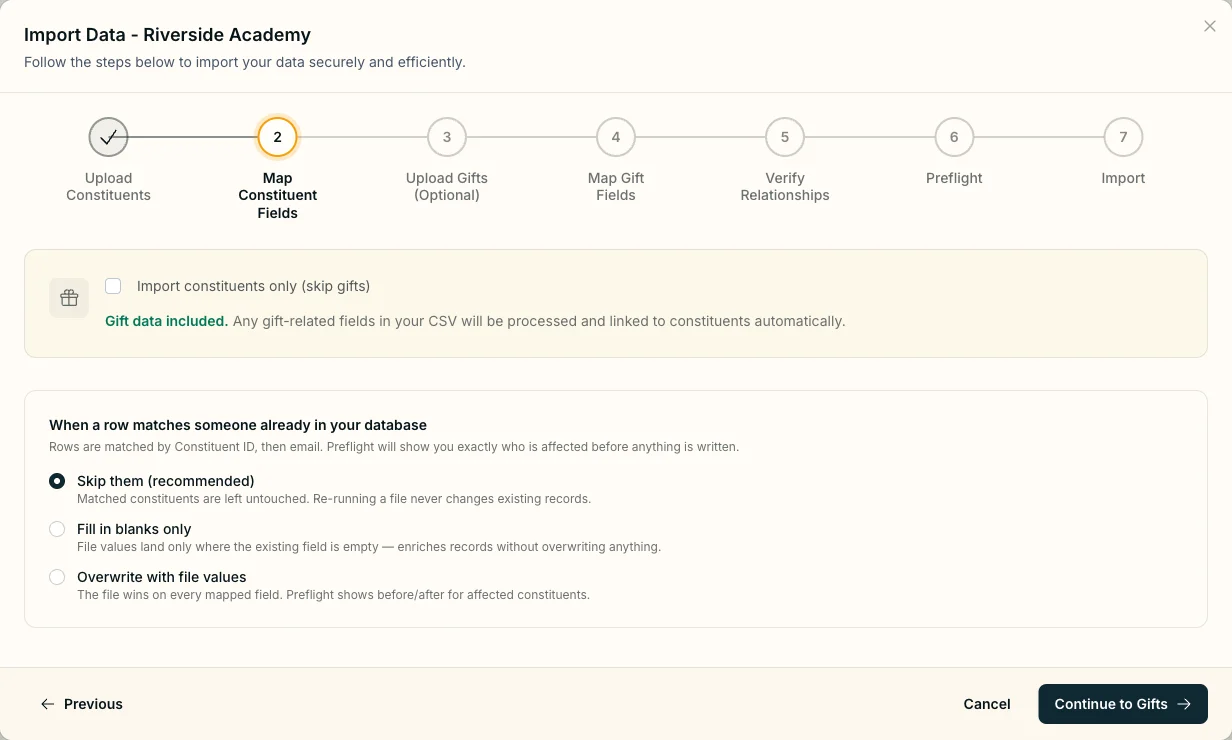
Each column is mapped to a field in Matreas, and you check the mapping. Rows are matched to people already here by the ID from your old system, then by email, and you decide what a match does. Before anything is written, a full dry run lists every record the import would create, update, hold for a person, or set aside as a duplicate.
A finished import can be rolled back. Every record it created comes out. Records it only updated stay as they are, and a new record that has since gained a gift or a note is kept and listed for you.
- Preflight. Step six of seven is the dry run. It counts creates, updates, held rows and duplicates, and shows what each update would change.
- When a row matches someone already here. Skip them, fill in blanks only, or overwrite with the file’s values. Skip is the default, so running a file twice never changes an existing record.
What does not come across cleanly
Saved queries and custom reports are definitions, not data. There’s no export for these, but we can help you rebuild them.
Custom fields need a home. Each one you keep has to land somewhere in Matreas, or be left behind on purpose. This is the most common place a move loses history.
Coming from Raiser’s Edge
Raiser’s Edge Database View ends on September 15, 2027. The importer was built and tested on Raiser’s Edge exports, and our guide sets out what the deadline means for a school office. Many schools will read it and stay on Raiser’s Edge NXT, and that is a fine outcome.
For a closer look, send us the same two exports. We run them through the import in analysis mode, which writes nothing anywhere, and you get a report on every column with no clean destination, every attribute category, suspected duplicates and your totals, then a 45-minute walkthrough.
Free, with no obligation. The assessment page sets out exactly how your files are handled.
What we’re building next
Matreas will be the system a school office runs its fundraising on. These are next. Beta schools see them first.
-
Checks read from a photo
Photograph the week’s checks and reply cards, and Gift Entry opens with the rows already filled in, each beside its picture. A person still looks at every row and presses Post.
Planned -
Email Data Input
Systems are only as good as their data, and we intend to make data entry as easy as possible. Forward an email and we’ll process it and map it to the relationships that matter.
Planned -
Memorials, kept as one record
A memorial becomes its own record: the family to tell, the gifts given in that name with a running total, and any Mass cards. Thanking the family no longer depends on someone’s separate list.
Planned -
The assistant your school already uses
Connect Claude, ChatGPT or Copilot to Matreas and ask it about your donors. It uses Matreas’s own definitions of a fiscal year and a household, so its numbers match your reports. It starts read-only.
Planned
Because relationships matter—
and so do receipts.
Matreas is in beta. Join and we’ll show you the software, answer your questions, and tell you when your school can start.
It’s the courage to share a vision.
The grace to ask with open hands.
The trust that integrity bears fruit.
"Where your treasure is, there will your heart be also."
— Matthew 6:21